(26) Fruma Expansion
- Published April 15, 2026
This guide aims to acquaint pre-fruma players with the broad strokes of changes implemented since Wynn version 2.2.
It aims to explain in broad strokes how such changes are relevant to modern gameplay and provide enough information to get started with the mentioned features.
This is not a changelog, and this is also not a guide. For exact changes, see the changelogs linked on the wiki.
Map Expansion
Article written by Wenweia:
This update added the long awaited FRUMA PROVINCE, located to the south of Corkus and to the west of Wynn. A 105-120 area, this new province is the player’s original homeland.
The new province has gates to the southwestern ocean (south of Relos), and to the Wynn plains (back of Ragni)
Level Bumps
Article written by Wenweia:
This update bumped the server’s combat level cap from 105 (106 bonus) to 120 (121 bonus) and the server’s effective profession maximum from 103 to 115 (level 130/131 remains the hard limit).
In doing so, the new combat level added an 8th [ability tree](/docs/major-changes/spellbound/The Ability Tree) page with brand new [ultimate abilities](/docs/major-changes/fruma#Ultimate abilities), and the new effective profession level added two new resource tiers (Titanium/Sturgeon/Jute/Maple at level 110 and Cinnabar/Mahseer/Heather/Redwood at level 115). Dernic was moved from level 103 to level 105 to accommodate this new progression.
New Graphics
Dialog System
Article written by Wenweia:
Using new features of Minecraft clients and enabled via Wynnpack, in this update, Wynn managed to extract character chats from the user’s chat and move them to a new dedicated display format!
Dialog from Quest NPCs and other characters will now appear in this new format, generally accompanied by a sprite image of the character speaking. The new format is able to offer users choices between several options, with this feature used frequently in newer quests (albeit rarely impacting progress beyond a single quest).
VFX Rework
Article written by Wenweia and akaPasta:
The new technical capabilities described above also enabled Wynn to move away from particles for spell actions and towards a new sprite system. Every single spell in the game, and most gameplay-related actions, now have animated art assets that render directly!
Since these can be overwhelming at times, Wynn also added the ability to control the transparency of these new animations with /toggle vfx <level>.
Item Overhaul
This update came with the fourth major change to the ways items function and the ways items display information.
New item behaviours
This update made it so that spells cast with one item persist across switches to another; if you try to drink a potion after casting a spell, it will no longer cancel the effects of your spell! Another change in a similar vein concerns item prerequisites: if your skillpoint distribution renders you unable to use an item, that item will now disable itself rather than unequipping..
New item tooltips
This update changed item tooltips such that their backgrounds are now custom texture assets. Unique items will have a plain gold box and a dark yellow background, mythic items will have a glowing purple frame outlining their purple background, etc.
Currently, these unique textures exist to differentiate normal (white), unique (yellow), rare (purple), legendary (blue), fabled (red), and mythic items (purple); crafted items (cyan); as well as ingredients (green).
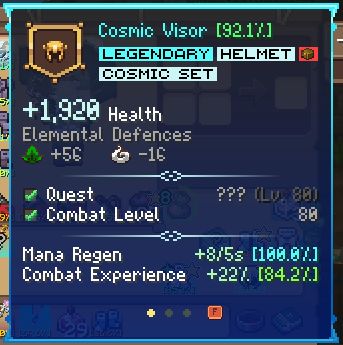
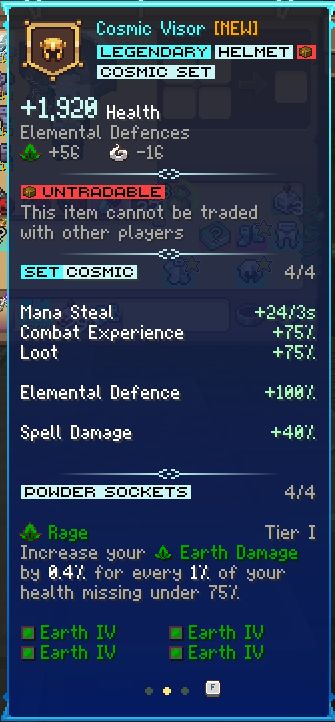
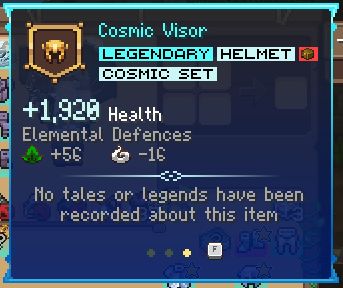
New item display modes
Items now display their information across three pages (i.e. display modes): you can cycle between these modes with your ‘swap hand’ button (default f). Switching your display mode will carry across all items and classes (i.e. if you are looking at an item’s powder view, you will see that view for any item you hover over)
The all pages detail the item’s effects (dps/def), with the first page now specifically detailing its identifications major and minor (unique properties and abilities respectively) and prerequisite requirements (generally combat level, skill point allocations, and quest requirements). Identification percentages (rolls) are now visible without mods through a new coloured slider!
The second page details information on the item itself (for instance, if it is untradable, part of a set, if it has powder slots, and if any powders have been applied in those slots. The third and final page contains the item’s lore (description/story).
Wards
Article written by akaPasta:
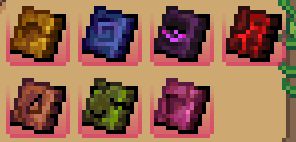
The Fruma Expansion brings an entire new category of items to the game: Wards. This includes the Yellow, Red, Blue and Purple Wards, found in raids, and the Green, Orange, and Pink Wards, found in lootrun end reward pools. These items are used for item ascension, a new feature covered below.
Set Properties
Article written by akaPasta:
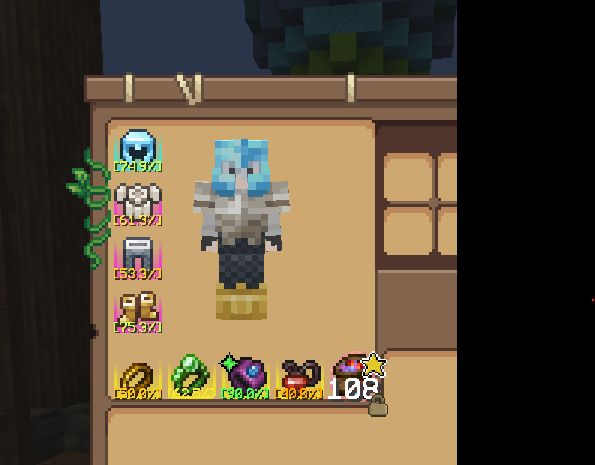
With the Fruma Expansion, set rarities were removed and replaced with special ‘set’ mechanics. Despite the visual change, sets function identically to set items before Fruma. Below is the full Morph set, which has been split up into Unique, Rare, and Legendary items.
The Item Upgrader
Article written by dwarfenmore:
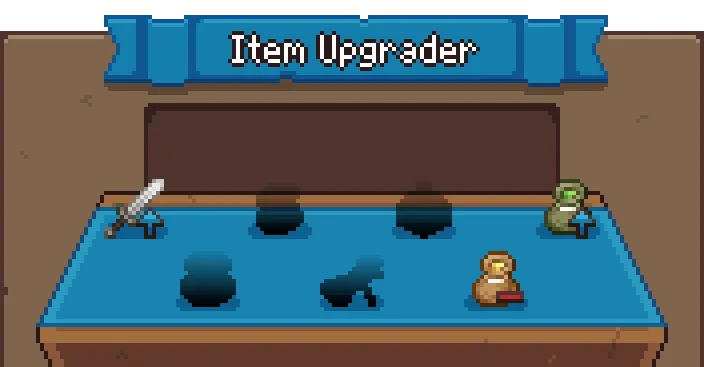
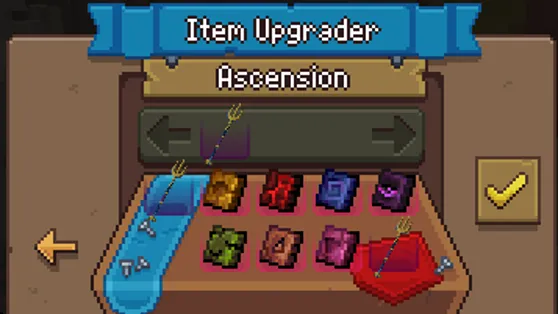
The Item Upgrader has inherited the Powder Master’s role while having some new features. Alongside upgrading powder tiers and removing powders from wepons/armor, the item upgrader now allows us to ascend mythics and tools, detailed below.
Item Ascension
Article written by dwarfenmore:
Using the Item Upgrader, two categories thus far can be Ascended; Gathering Tools and (select) Mythics. Gathering Tools can be ascended using dungeon fragments to their respective higher tier. As you increase in tier, both the level of dungeon fragments and the quantity of the fragments increase to ascend to the next tier.
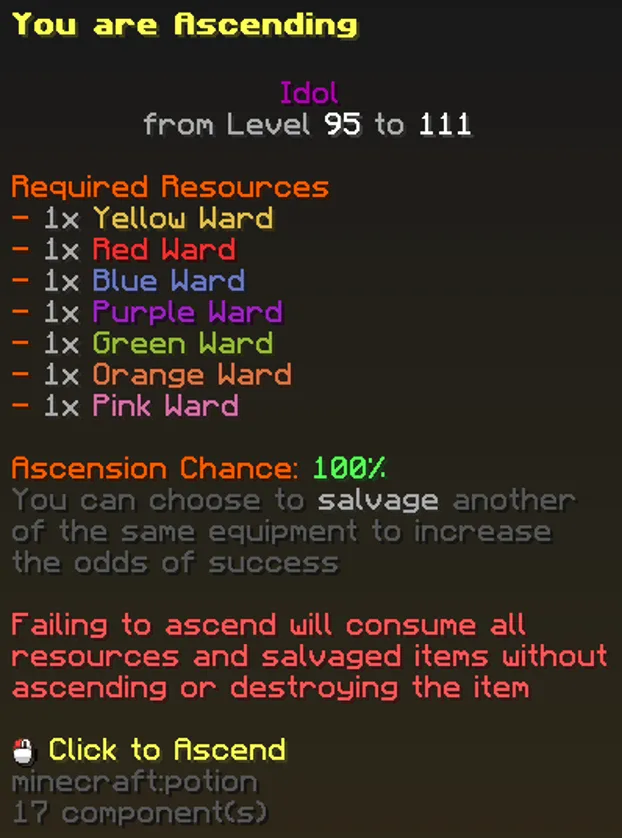
Eventually, all mythics will be ascendable, although only a handful are able to as of writing. Mythic ascension requires a full set of 7 wards for a 30% chance of ascension, which can be increased to 100% by sacrificing another of the same mythic. Ascended mythics retain the original mythic roll percentages, though have increased base damges, increased floors/ceilings on some IDs, can have entirely new IDs, or new Major IDs
T7 Powders
This section has not yet been written! We hope to have it ready soon!
Powder Restrictions
This section has not yet been written! We hope to have it ready soon!
Mounts
This section has not yet been written! We hope to have it ready soon!
(This will need to explain the 3 types in the game, the basics of where to breed them, what happened to old horses, and general info at a very superficial level. This is such a massive change that it will warrant a standalone guide-level article, which this should defer to.)